
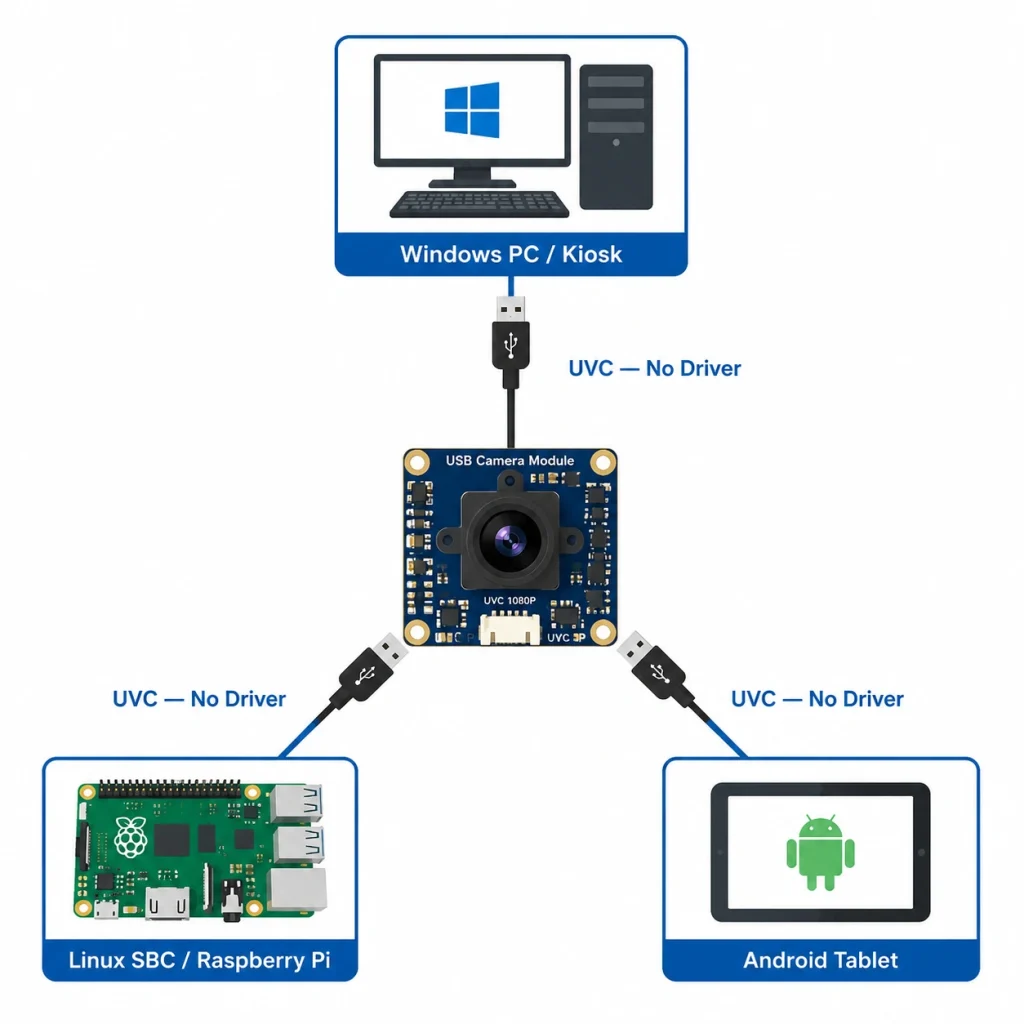
Short answer: A USB camera module connects to any host — Windows, Linux, Android, macOS, Raspberry Pi, NVIDIA Jetson, x86 embedded PC — over a standard USB port and enumerates as a UVC (USB Video Class) device requiring no custom driver. Resolutions range from 720p to 4K at USB 3.0 bandwidth; USB 2.0 supports up to 1080p at 30 fps uncompressed or higher with onboard MJPEG/H.264 compression. For kiosk, self-service terminal, and embedded vision applications where driverless host compatibility is more important than minimum latency, a USB camera module is almost always the correct interface choice.
Most embedded vision projects default to MIPI CSI-2 for high-performance SoC deployments and USB for everything else — but "everything else" covers an enormous range of real production hardware: x86-based kiosk computers, ARM SBCs running custom Linux builds, Android industrial handhelds, Raspberry Pi terminals, and Windows-based quality inspection stations. What these platforms share is a USB port and a need to start capturing frames without spending weeks on BSP driver porting. Full UVC compliance means the camera works on these platforms without any modification — the camera enumerates and streams, and that is the entire contract UVC provides.
This guide covers the technical architecture of USB camera modules — UVC compliance, USB 2.0 vs 3.0 bandwidth, onboard ISP vs host ISP, compression options, and the practical integration steps for Linux, Windows, and Android — plus the application-specific considerations for kiosks, face recognition terminals, smart retail, and industrial inspection that most generic USB camera datasheets don't address. See our broader USB vs MIPI vs DVP interface comparison and camera module applications guide for context on where USB fits in the wider landscape.
Key Takeaways
- UVC compliance = driverless operation on Windows 7+, Linux kernel 2.6.26+, Android 3.1+ (USB OTG), and macOS — one hardware SKU works across all target platforms without custom BSP work.
- USB 2.0 bandwidth limit (~480 Mbps theoretical, ~40 MB/s usable) caps uncompressed throughput at approximately 1080p @ 30 fps; onboard MJPEG at 10:1 compression enables 4K on USB 2.0 links.
- Onboard ISP (in the module) handles RAW→YUV/MJPEG conversion, reducing host CPU load and enabling UVC compatibility; host ISP (MIPI path) gives more tuning control but requires a host with MIPI receiver.
- Anti-flicker and face-priority AE are ISP register parameters that must be verified against your deployment lighting — not assumed from a datasheet — particularly for indoor fluorescent and LED environments.
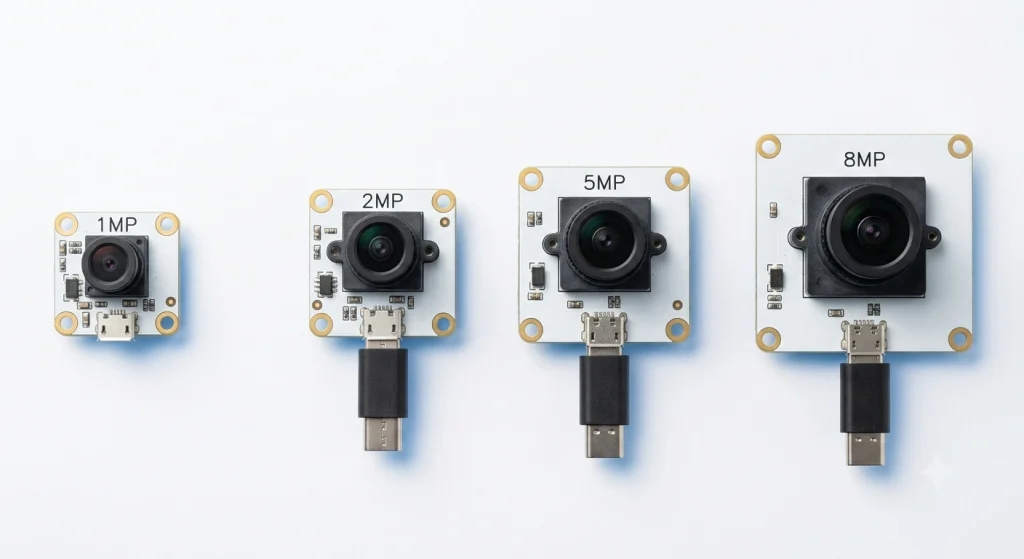
- Smeiker supplies USB camera modules from 1MP to 8MP in UVC-compliant, ISP-tuned configurations for kiosk, access control, and industrial terminal applications, with ODM customization from 500 units.
USB 2.0 vs USB 3.0: Bandwidth, Resolution & Compression Trade-offs
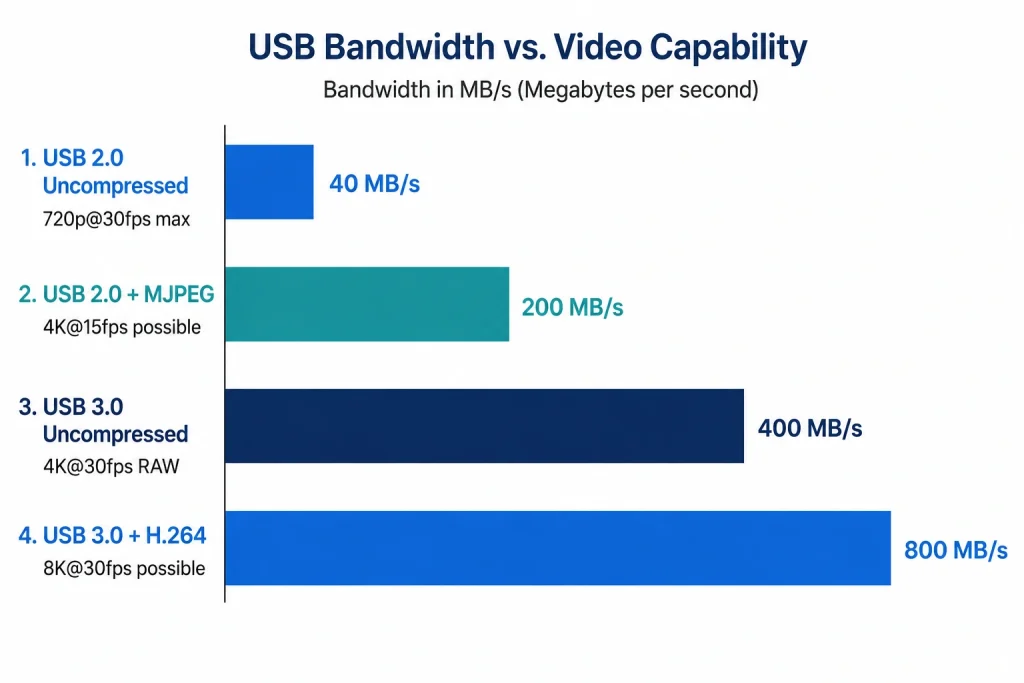
USB 2.0 High Speed provides 480 Mbps theoretical bandwidth with approximately 40–44 MB/s usable for video streaming after protocol overhead. USB 3.0 (SuperSpeed) provides 5 Gbps theoretical with approximately 380–400 MB/s usable. This bandwidth difference determines what resolutions and frame rates are achievable without onboard compression:
- USB 2.0 uncompressed (YUV422): 720p @ 30 fps (≈33 MB/s ✅) · 1080p @ 30 fps (≈74 MB/s — exceeds USB 2.0 usable bandwidth ❌ uncompressed)
- USB 2.0 with MJPEG compression (10:1): 1080p @ 30 fps (≈7.4 MB/s ✅) · 4K @ 15 fps (≈20 MB/s ✅) — MJPEG at 10:1 fits comfortably within USB 2.0
- USB 3.0 uncompressed: 1080p @ 60 fps (≈148 MB/s ✅) · 4K @ 30 fps RAW8 (≈237 MB/s ✅) — all practical resolutions fit uncompressed
For most kiosk and terminal applications (face recognition at 1080p, access control at 2MP, smart retail at 2–5MP), USB 2.0 with MJPEG compression is fully adequate and simplifies host-side integration because every consumer USB port is USB 2.0 compatible. Choose USB 3.0 when you need uncompressed RAW for machine vision measurement accuracy, 4K @ 30 fps streaming, or when your application is sensitive to MJPEG compression artifacts in fine texture detail (document scanning, barcode reading at extreme FOV).
One frequently overlooked detail: USB 3.0 cable and connector quality becomes critical above ~3 m of cable length. A poor-quality USB 3.0 cable that would work fine at 1 m will cause USB 3.0 to fall back to USB 2.0 SuperSpeed negotiation at 2–3 m, silently halving your effective bandwidth. Specify your cable length before finalizing your USB version requirement.
Platform Integration: Linux, Windows & Android
Linux (Embedded & Desktop)
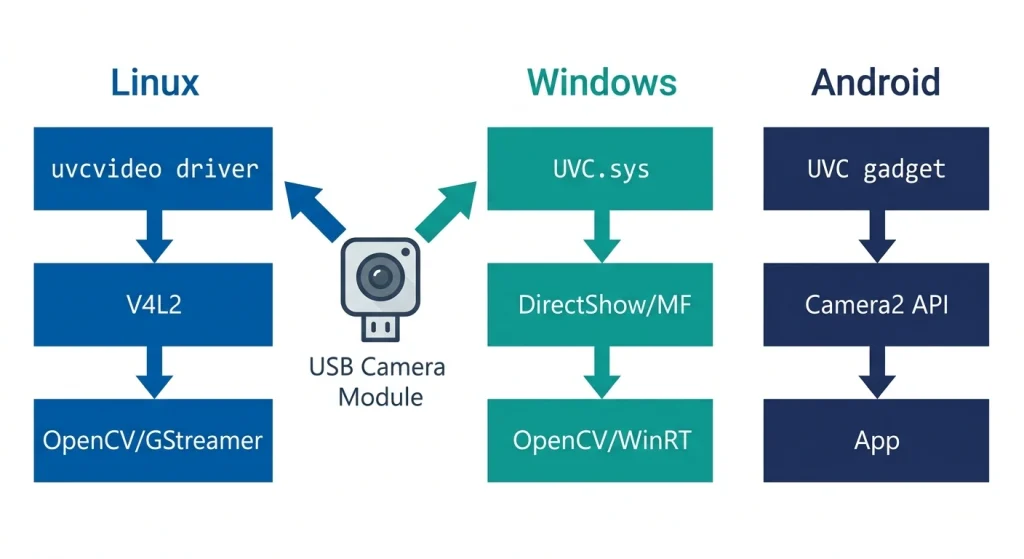
On Linux, a UVC-compliant USB camera module is handled entirely by the kernel's uvcvideo driver, which has been mainline since kernel 2.6.26 (released 2008). No module installation, no kernel compilation. Connect the camera; check ls /dev/video* for the device node; capture with v4l2-ctl --list-formats-ext to verify supported resolutions. Integration with OpenCV is two lines:
import cv2
cap = cv2.VideoCapture(0)  # 0 = first UVC device
For embedded Linux on custom kernels, verify that CONFIG_USB_VIDEO_CLASS is enabled in your kernel config. On Yocto/Buildroot builds, this is often disabled by default to reduce image size. A USB camera module that fails to enumerate on your embedded Linux build is almost always this kernel config flag, not a hardware fault.
Windows (Embedded & Desktop)
Windows 7 through Windows 11 include full UVC driver support. A USB camera module enumerates as a DirectShow / Media Foundation capture device with no driver installation. On Windows IoT Enterprise (the embedded variant used in many kiosks), UVC support is included in the base image. Access via DirectShow in .NET/C++, MediaCapture in UWP/WinUI, or OpenCV's VideoCapture(0) on Windows — all three work with any UVC-compliant module. For access control and kiosk applications on Windows, Microsoft's Windows Hello Face API (available on Windows 10/11 Pro and Enterprise) is compatible with UVC camera modules when the camera exposes an IR/depth stream — verify with your algorithm vendor which UVC stream format is required.
Android (USB OTG)
Android 3.1 introduced USB Host mode; Android 5.0+ includes a built-in UVC camera stack. On devices with USB OTG hardware (virtually all modern Android tablets and SBCs running Android), a UVC camera module connected via OTG adapter is accessible through the Camera2 API as an external camera. The saki4510t/UVCCamera open-source library provides a well-tested Java/JNI wrapper for USB camera module integration on Android devices that don't expose the camera through Camera2 (common on older Android versions and some industrial Android builds). Validate UVC OTG behavior specifically on your target Android hardware before finalizing module selection — some industrial Android SBCs have USB-IF certification but disable OTG current delivery, which prevents bus-powered camera modules from receiving adequate power.
Factory Perspective — UVC Enumeration Failure on Custom Embedded Linux: "A customer building an Android-based industrial handheld terminal for warehouse barcode scanning contacted us after our USB camera module failed to enumerate on their custom Android 9 build derived from an Allwinner A33 BSP. On a standard Android tablet the module worked immediately; on their custom build, adb shell ls /dev/video* showed no device node. After reviewing their kernel config, we found CONFIG_USB_VIDEO_CLASS was disabled in their BSP kernel — the vendor's default Allwinner BSP removed it to reduce binary size. We provided a one-line kernel config change and a Yocto recipe fragment. Rebuild time was 45 minutes; the camera enumerated immediately on the next boot. The customer had estimated this bug would cost them 2–3 days of investigation. Having a supplier who knows the Linux UVC driver stack — not just the hardware — is the difference between a half-day fix and a week of wasted engineering time." — Smeiker Technical Support Team
USB Camera Module: Application-Specific Integration Considerations
Kiosks & Self-Service Terminals
Kiosk deployments prioritize long-term driver stability over peak image quality — a kiosk running unattended for 5 years on Windows 10 LTSC or Ubuntu 22.04 LTS cannot have its camera stop working after an OS update. UVC compliance is the correct architectural choice here because Microsoft and the Linux kernel team maintain the UVC driver stack for the full OS lifecycle, and a UVC-compliant USB camera module validated in 2024 will still work on the same OS version in 2030 without any driver maintenance. Specify USB 2.0 with MJPEG compression for face recognition (1080p @ 30 fps) and USB 3.0 for document scanning applications requiring uncompressed RAW for OCR accuracy.
Face Recognition & Access Control
USB camera modules for face recognition terminals require ISP configuration beyond the factory default — particularly anti-flicker register tuning for your regional mains frequency (50 Hz in Europe/Asia, 60 Hz in North America) and face-priority auto-exposure weight map. These parameters can be set through UVC Extension Units if the module's XU interface exposes them, or pre-configured in the factory ISP register table by the module manufacturer. Always confirm which method your supplier uses, because a module where these parameters are locked to factory defaults cannot be corrected in the field. See our face recognition camera module guide for the complete ISP parameter checklist.
Industrial Inspection on x86 Vision PCs
USB 3.0 camera modules are widely deployed in PC-based machine vision systems using HALCON, VisionPro, or OpenCV on Windows. For inspection applications requiring global shutter (moving conveyor, robotics), specify a global shutter USB camera module — Sony Pregius IMX296 or IMX265 are the standard choices. USB 3.0 at 5 Gbps supports these sensors at full resolution and frame rate without compression, preserving the RAW pixel data that measurement algorithms require. Review our global shutter vs rolling shutter guide for shutter type selection criteria.
Project Case — USB 2.0 vs USB 3.0 Selection for a Smart Retail Terminal: "A smart retail analytics company came to us spec-ifying USB 3.0 camera modules for their shelf-mounted footfall counting cameras, reasoning that higher bandwidth was always better. Their host board was an Intel Celeron N4100 NUC with two USB 3.0 ports. We pointed out that their algorithm (people-counting heatmap at 1080p @ 15 fps using YOLOv8 nano) consumed approximately 14 MB/s of camera bandwidth — well within USB 2.0's 40 MB/s usable capacity, and that using both USB 3.0 ports for cameras was limiting their I/O expansion options (their POS integration required one USB 3.0 port for a receipt printer controller). We supplied two USB 2.0 MJPEG modules (OmniVision OV2710, 1080p @ 30 fps, MJPEG at 10:1) and a USB 3.0 slot remained free for the printer controller. Unit cost saving versus USB 3.0 modules: $3.20/camera. For their 400-terminal rollout, that was $1,280 in BOM savings — not transformative, but validated the principle that matching USB version to actual bandwidth requirement beats defaulting to maximum specification." — Smeiker Applications Engineering Team
Frequently Asked Questions
What is a USB camera module and how does it differ from a MIPI module?
A USB camera module contains an onboard ISP and USB controller that converts RAW sensor data to YUV or MJPEG/H.264 and outputs it over USB as a UVC device — compatible with any USB host without custom drivers. A MIPI camera module outputs RAW sensor data directly over MIPI CSI-2 to the host SoC's ISP, requiring a MIPI-capable host but delivering lower latency and more ISP tuning control.
Does a USB camera module work on Raspberry Pi?
Yes. All Raspberry Pi models with USB ports support UVC camera modules — connect via USB, and the module appears as /dev/video0 under Raspberry Pi OS. No additional configuration is required. Access with libcamera, fswebcam, or OpenCV's VideoCapture(0). Note that Raspberry Pi also has a MIPI CSI-2 connector (separate from USB) for camera modules using the native Raspberry Pi Camera interface.
What resolution can I get over USB 2.0?
With MJPEG compression (standard on all modern UVC modules), USB 2.0 supports up to 1080p at 30 fps and 4K at 10–15 fps. Without compression (uncompressed YUV422), USB 2.0 is limited to approximately 720p at 30 fps. USB 3.0 supports 4K at 30 fps uncompressed.
Can I use multiple USB camera modules on one host?
Yes, subject to USB host bandwidth. A USB 3.0 host can support multiple simultaneous USB camera module streams; bandwidth per camera must sum below the usable limit (~380 MB/s for USB 3.0). On USB 2.0, two 1080p MJPEG streams at 30 fps each consume ~14 MB/s total — well within limits. Each module appears as a separate /dev/videoN device on Linux, selectable by device node or by USB ID.
Does Smeiker offer custom USB camera modules?
Yes. Smeiker's USB camera modules are available in ODM configurations with custom PCB dimensions, M12 lens selection, NIR LED ring integration, ISP register tuning for your specific lighting environment, and USB Type-A or Type-C connector. UVC compliance is maintained across all custom configurations. MOQ from 500 units; sample lead time 4–8 weeks. Contact us with your specification.
Need a USB Camera Module for Your Project?
Tell us your host platform, resolution, lighting environment, and annual volume. Smeiker will configure a UVC-compliant USB camera module with factory ISP tuning matched to your deployment conditions.
Get a Free Quote →